
What's New At Breadboard
At Breadboard, we're constantly evolving to help electronics engineers and procurement professionals work faster and smarter. From AI-powered component recommendations to real-time inventory across 50+ distributors, these updates are built from your feedback to solve real challenges.

.webp)
Multi-Layer BOM Support
Introduce support for multi-level bills of materials, allowing users to upload and manage hierarchical assemblies within projects with clear associations and navigation.
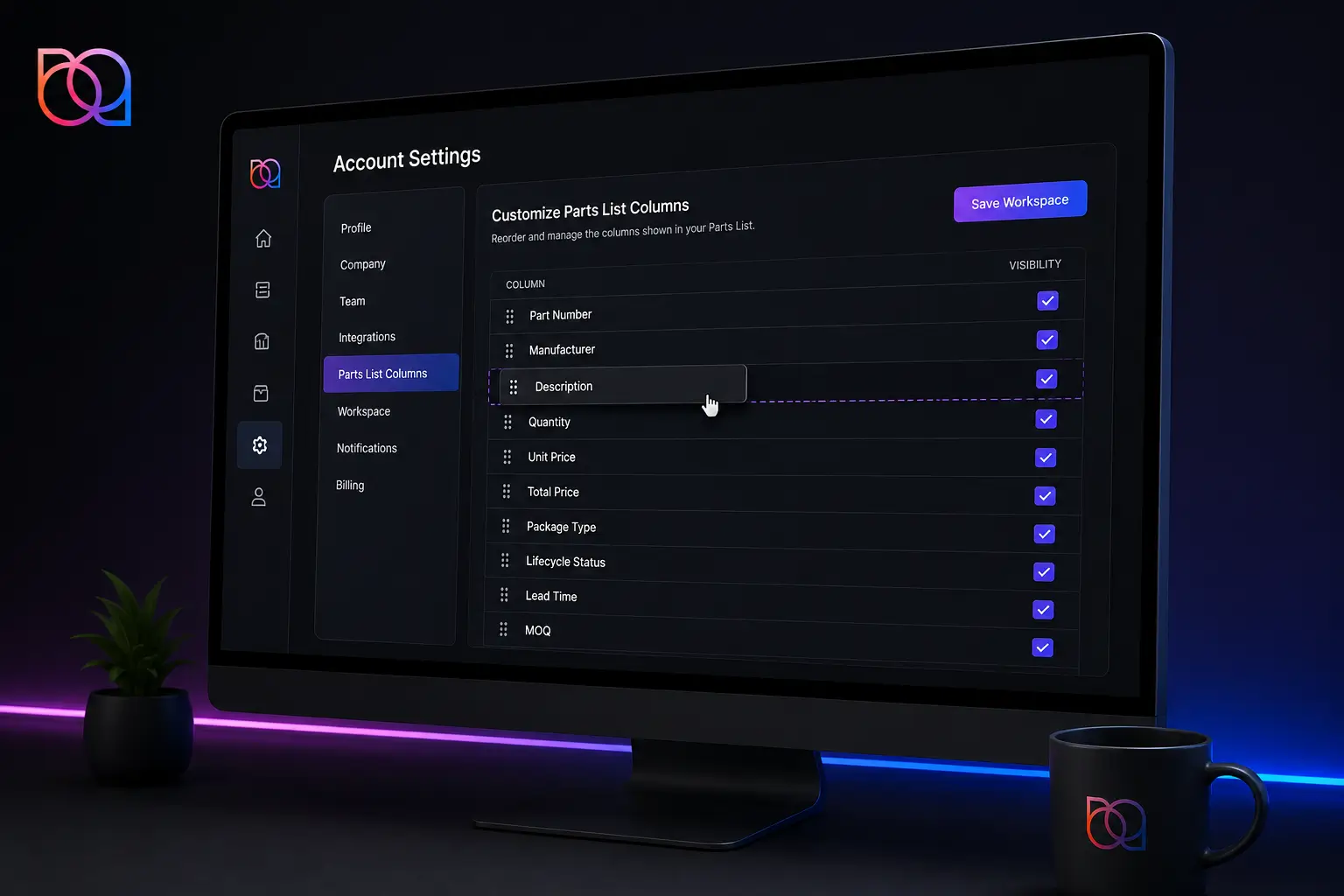
Customize Parts List Column Workspace
Reorder Parts List columns via drag-and-drop in Account Settings and save your part list workspace.
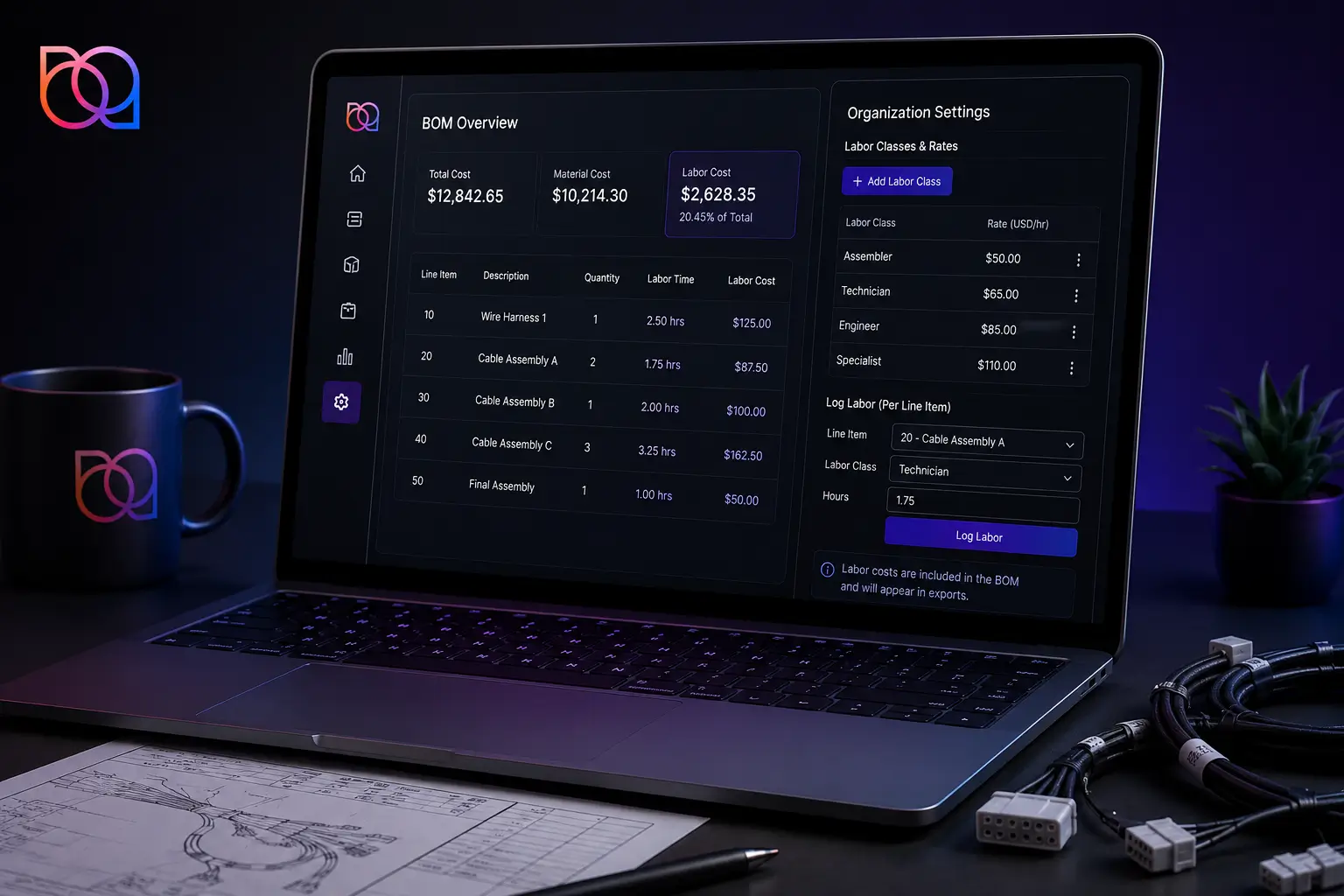
In-App Cable Labor Calculations
set up labor classes & rates in organization settings, log labor per line item, and see labor costs in the BOM and exports
Bid Comments
Notes from the RFQ Excel template now carry into the bid comment
Automatically transfer and import RFQ notes from clients into custom bids. Saves time, improve bid quality, and helps provide clearer instructions for other team members downstream.
Project Export
added Project Description, Job Type, Order Type, and Customer RFQ to the project export
Project Exports supports real time weekly team meetings. Get the latest quote status, progress reports, ownership, and critical assignments in front of every internal discussion.
In-App Cable Labor Calculations
set up labor classes & rates in organization settings, log labor per line item, and see labor costs in the BOM and exports
Specifically useful for Cable Assembly Projects where labor needs to be calculated. Labor costs can now be calculated for cable assembly projects which improves quality of quotes.
Manufacturer Alias Table
Save manufacturer alias mappings during BOM upload and manage them in Account Settings
Users have more control over manufacturer name normalization. Save your own alias mappings once, and Breadboard will remember your prefrences. Saves time on every BOM upload. Improves data quality.
Percentage-Based Attrition
Attrition is now applied as a percentage and calculated consistently across all batch sizes
When manually overriding attrition values, instantly apply changes across all batch sizes without doing mental math. Save time and remove human error.
Customize Parts List Column Workspace
Reorder Parts List columns via drag-and-drop in Account Settings and save your part list workspace.
Tailor your part list columns to what you want to see and focus on what matters. Improves the usability of Breadboard.
Allocation Preferences based on Package Type
There are many different types of packaging (Tape and Reel, Cut Tape, Custom Reel, etc.). By filtering by priority tier, secondary tier, and base tier, the algorithm will take it into account. Breadboard's algorithm is here to make the the selection process easier, faster, and more accurate. The less manual work, the better!
More accurate selections from the auto-allocation algorithm. Reducing the time to review each selection the algorithm makes.
Updating your package preferences happens in Algorithm preferences in settings. While using auto-allocation, you can choose to use your preferences.
Updated Settings Navigation
A new section called Algorithm Preferences now houses Supplier Preferences and Package Preferences. These are where Breadboard will house preferences for the Auto-Allocation.
More customizations available for auto-allocation!
There is a new section in settings called algorithm Preferences
Internal Inventory Allocation Support by Customer
Breadboard has had the ability to load internal inventory to Breadboard so the inventory can be allocated to quotes. This feature adds the ability to include your customers inventory for allocation for their quotes only.
Allocate internal inventory to specific customers by name.
When uploading the file to the SFTP folder, add a new column named customer. There is a new section called Internal Inventory in the project details.
Multi-Layer BOM Support
Introduce support for multi-level bills of materials, allowing users to upload and manage hierarchical assemblies within projects with clear associations and navigation.
Manage complex assemblies with nested BOM structures within the same framework that already exists.
Breadboard now maps to specific columns like parent reference or level. The purple shows the sub-assemblies. We've implemented pooled parts and aggregate quantities to help with allocation.
Project Status Report for Meetings
An export report gathering which quotes are open and who is responsible for working on them. This download allows regular status updates to help keep quotes moving.
A standup-ready summary of project health across your team.
On the project management screen, there is an export projects button. Then, you can select different filters of data to be exported.
Lead Times Displayed in Weeks
There have been instances where Breadboard shows lead time in days and weeks. Moving forward, all lead times will be standardized to weeks.
Going by weeks helps Breadboard follow standards in the industry.
This has been updated on our end.
Excess Cost Column
The excess cost of parts had been shown in red underneath the price in the parts table, making it difficult for users to track and analyze it efficiently. By making excess cost it's own column, it is easy to see and export.
To help users quickly identify and prioritize parts contributing the most to wasteful spending.
You can toggle the column on the part list supplier/column settings.
Improved Column Manufactuer Name Mapping
New aliases added during the mapping process to help with speed.
Speeding up the mapping process.
BOM Level notes
Add notes relevant to the BOM. These notes will be saved with the BOM.
Add context, caveats, or instructions directly at the BOM level.
You can add BOM Level Notes by pressing the setting wheel in the Part List. Then, you can update your export to include the BOM notes.
Custom Phases for Projects and BOMs
Breadboard is now giving you the option to customize standard/exisitng phase labels and add custom labels to further allow personalization to your workflow. There are three stages: 1. Open, 2. On Hold, and 3. Completed.
Define your own workflow stages to match how your team actually works.
You can update the phases by navigating to Settings --> Account Settings --> Project Phase Labels
Auto-Allocation and Batch Sizes
Fixed bug where auto-allocation was incorrectly using rows that had no allocations. There were circumstances where using auto-allocation would remove allocations on another batch size.
Not losing any data. Not having to go back through your work. Confidence in Breadboard.
Log and Record Auto Allocation Data
New feature to persist all competing bids during auto-allocation, enabling won vs lost reporting by supplier.
The ability to report on opportunities won vs lost by supplier after auto-allocation so you can negotiate better pricing.
- This is an opt-in feature per organization.
- Additional cost to get these insights to help with negotiation
Wrong Connection Type in Supplier Management
Fixed incorrect connection type displaying for suppliers (e.g., showing "Direct" instead of "Proxied")
Better knowledge on what connection types are being displayed in supplier management.
RFQ Attachment Download Link
Restored missing RFQ attachment download links for Gov Cloud accounts.
Within the Gov Cloud accounts, this helps include the download links when sending RFQs out to suppliers. Leading to faster response times from suppliers and less back and forth.
Fixing part numbers using special characters
Resolved a formatting issue where part numbers containing a (/) or a (+) were processed incorrectly.
This will help with the usage of (/) and (+) within part numbers so they are treated differently.
Manufacturer Alias Table Additions
Updated the manufacturer aliases within Breadboard to improve data consistency across multiple naming conventions when loading BOMs.
The updated manufacturer naming conventions have been added to Breadboard's table to enable faster, smoother BOM uploads. There will be less errors and manual work when in the parts list.
RFQ Auto-Extraction Failing
Fixed a network issue affecting auto-extract workflows in some environments.
The auto-extract feature encountered network failures in some environments. The feature was timing out on larger auto-extract requests.
Batch Sheet Export Fixes
Improved batch sheet processing to include all data that is expected on export.
In some circumstances, there was data being left off the export due to the previous update. We have fixed those errors for everything to show up as expected.
Refactoring of Auto-Allocation Algorithm
Refactored portions of the auto-allocation algorithm (A3) to support future customization and improve performance.
- During QA we found that the auto-allocation algorithm was making better decisions
- Improved performance
- Will allow us to add more customizations (ie. package preferences and lead time preferences)
User Management
Up until this point, Breadboard has required the dev team to make any edits to users on the backend. With this update, anyone on the team will be able to make updates!
The team will be able to add, update, or change user information much faster and without the help of the dev team. Leading to the devs focusing on more bug fixes, new features, and enhancements to Breadboard!
RFQ "Select All" Bug
When creating an RFQ and there are multiple BOMs in a project, if you press "select all" this will deselect any previous selections. This would mean having to go back and reselect all lines items.
Highlighted Elements in Light Mode
As a user viewing Breadboard in light mode, the highlight color for partial matches was too similar to the light mode background to clearly see the differences.
Users that activate light mode, will more easily see the highlighted elements.
Search Icon
The search button icon not responding when trying to use it.
As a user, you will be able to press "Enter" or press the magnifying glass button. This will make Breadboard easier to use for which ever route works best for you!
Adding Custom Bid Comments to the Export
Fixing bid comments being duplicated in the export comments on all suppliers
Custom Bid Comments
Adding the ability to include comments to custom bids
There will be a new column added to the availability tab where comments on custom bids will show up.
Real-Time Inventory Across 50+ Distributors
No more ordering out-of-stock parts. See live inventory levels from Digi-Key, Mouser, Arrow, Newark, and 46 other distributors directly in search results.
- Live stock quantities updated every 15 minutes
- Lead time estimates for backordered components
- Price breaks at multiple quantity tiers
- One-click compare across all distributors
Common Questions:
Q: How often does inventory data update?
Every 15 minutes during business hours, hourly overnight.
Q: Can I filter by in-stock only?
Yes, use the new "In Stock" filter in the left sidebar.
BOM Health Scanner
Upload your bill of materials and instantly identify risks: obsolete parts, single-source components, and supply chain vulnerabilities before they derail your production.
- Automated obsolescence checking against 3M+ components
- Lifecycle status warnings (active, NRND, EOL)
- Alternative part suggestions for at-risk components
- Export detailed risk reports for stakeholders
Common Questions:
Q: How often does inventory data update?
Every 15 minutes during business hours, hourly overnight.
Q: Can I filter by in-stock only?
Yes, use the new "In Stock" filter in the left sidebar.
Advanced Parametric Search Filters
Search 2M+ components 3x faster with 200+ new parametric filters. Find exact specs without endless scrolling through irrelevant results.
- Range sliders for voltage, current, resistance, capacitance
- Multi-select for package types and mounting styles
- Temperature grade filtering (-55°C to +150°C)
- Certification filters (RoHS, REACH, AEC-Q100)
Altium Designer Plugin
Access Breadboard's 2M+ component database directly inside Altium Designer. Search, compare, and add components to your schematics without leaving your design environment.
- One-click component import with verified footprints
- Real-time pricing and availability in component panel
- Automatic BOM generation with distributor links
- Sync component updates across all project files
Common Questions:
Q: Which Altium versions are supported?
Altium Designer 20.0 and newer.
Q: Does this require a Breadboard account?Y
es, free accounts get 50 component imports/month, unlimited for Pro users.
Comparison Tool Redesign
Compare up to 10 components side-by-side with our rebuilt comparison interface. See differences highlighted automatically, export comparisons as PDF, and share with your team.
- Smart highlighting of spec differences
- Customizable comparison criteria
- Save comparison sets for later reference
- Export to PDF, Excel, or shareable link
3x Faster Search Performance
We rebuilt our search infrastructure from the ground up. Complex parametric searches that took 8-12 seconds now return results in under 2 seconds.
- Range sliders for voltage, current, resistance, capacitance
- Multi-select for package types and mounting styles
- Temperature grade filtering (-55°C to +150°C)
- Certification filters (RoHS, REACH, AEC-Q100)
AI-Powered Component Recommendations
Find the perfect component in seconds with intelligent suggestions based on your design requirements. Our AI analyzes millions of specs to recommend alternatives that match your electrical, mechanical, and budget parameters.
Engineers using this feature report 65% faster component selection and discover better-fit alternatives they would have missed in manual searches.
Designed and built with❤️ in NYC
Copyright 2025 © All rights reserved
